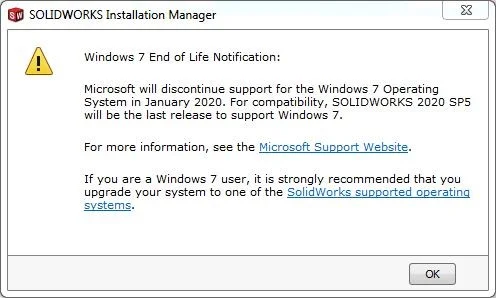

Have you seen this message when installing SolidWorks 2018? With each major release it’s important to check the system requirements before installing.
Windows 7 is currently the most popular operating system, with about 68% of PCs worldwide using this OS! But did you know it’s currently past “mainstream” support? As a Windows program, SolidWorks will discontinue support for that operating system, so as you’re choosing new systems keep that in mind!
From the Windows website:
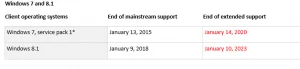
*Support for Windows 7 pre-service pack 1 ended on April 9, 2013. Be sure to install Windows 7 Service Pack 1 to continue to receive support and updates.
https://support.microsoft.com/en-us/help/13853/windows-lifecycle-fact-sheet
Here are the SolidWorks dates for Windows 7 support going forward:
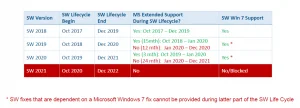
So what does this mean to SolidWorks users? Customers running 8.1 should plan on migrating to Windows 10 to install SOLIDWORKS 2019 or newer. Windows 7 will need to migrate if installing SolidWorks 2021 or newer.
Also remember to check Windows Server product compatibility before upgrading (PDM, SolidNetwork Licensing, etc.)
SOLIDWORKS Server Products
Operating System SOLIDWORKS 2016 SOLIDWORKS 2017 SOLIDWORKS 2018
Windows Server 2016 – (2017 SP2)
Windows Server 2012 R2
Windows Server 2012
Windows Server 2008 R2, SP1
–
And be sure to stay up-to-date with all the system requirements.