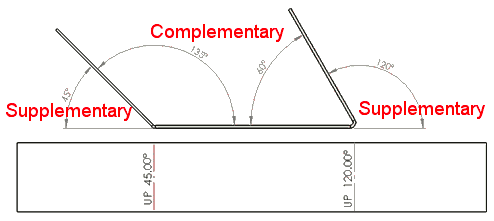

How to change a SOLIDWORKS Bend Note angle to be Complementary or InsideWhat is a complementary angle?
What am I referring to with changing the bend note angle to be complementary? Unfortunately, this won’t mean that your flat patterns will praise how great of a designer you are, but it certainly could help impress the manufacturing department! Check out the image below describing the difference between the supplementary and complementary angles as measured on a bent sheet metal part.
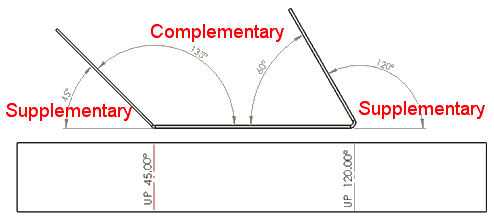
Explaination of Supplementary and Complementary angles
Why would I change the Bend Note?
If your shop is using a European manufactured brake, it may require the bend angle to be input as the complimentary value, or in other words, the angle measured from inside the bend. By default, SOLIDWORKS uses the supplementary angle (outside measure) when detailing a flat pattern with bend notes. The great news is that there are multiple ways to adjust this setting either for one time, or permanently.
Change the Bend Note for a Drawing View
The first, and easiest way will change all of the bend notes in selected flat pattern drawing views.
In the Bend Notes section of the property manager, select the
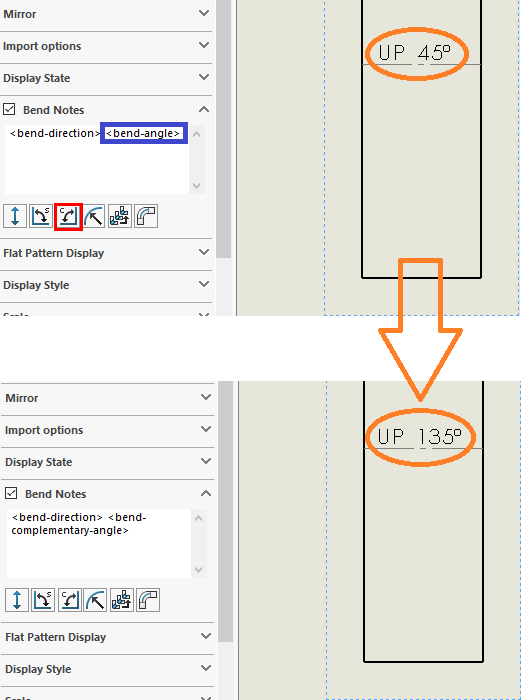
Update the Bend Notes section for a drawing view to change all Bend Notes in that view
If individual bend notes need to be adjusted, double clicking the note will bring up the defining text which can be adjusted in the same way.
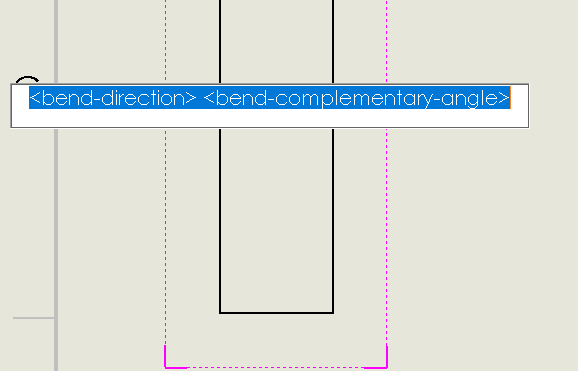
Adjusting individual Bend Note contents is also possible
Set it at the System Level
If you always want your bend angles to be Complementary, then this can be set at the system level by editing the bendnoteformat.txt file found in the installation directory.
Reference the SOLIDWORKS online help file topic which will adjust this setting permanently.
What else can be customized?!
If you’re curious about other settings that can be adjusted, or if you’ve been trying to figure out how to change a setting inside SOLIDWORKS, then search the Javelin Blog, attend one of Javelin’s training courses in your area or online, or simply contact us to see how we can help!