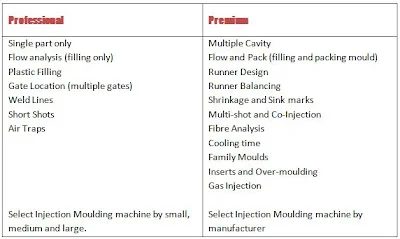

You may be aware of SolidWorks Plastics, but are you aware of the benefits that its functionality could give you?
SolidWorks Plastics is a fully integrated tool set for SolidWorks that allows users to simulate the injection molding process for your SolidWorks designs.
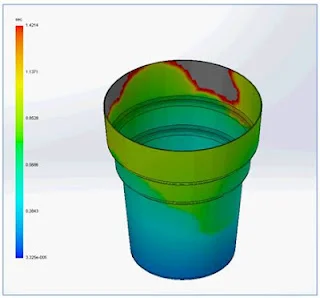
For this example, a basic plastic cup made from ABS Polycarbonate is used.

Using SolidWorks Plastics Professional to run a simulation study, it can be seen that the original wall thickness of the cup was too thin which caused a “short-shot” and the cup would not have been moulded fully. This is where the plastic material reaches a solidified state through cooling before it can completely fill the mold and is often evident where thin sections of the design cause the plastic to cool too quickly.
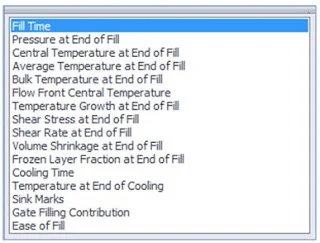
There are also options to view areas where Sink Marks, Weld lines, and Air traps may occur so that you can consider alternate gate locations and vents in the mold tool.
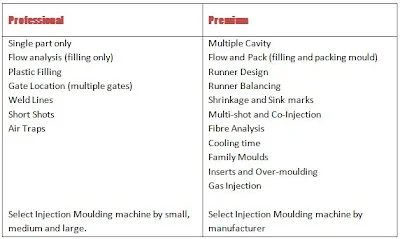
By using SolidWorks Plastics Professional, it is possible for designers to fully consider the manufacturing capability involved in the final production of their plastic designs. This allows them to anticipate and re-design at a stage in the design process where the cost implications are minimal.
By using SolidWorks Plastics Premium, the mould tool can also be considered through the introduction of family molds and runner systems. This has the possibility to save on costly re-working or re-designing mold tools.
Want to learn more about SolidWorks Plastics? Visit our website to watch our First Look video and get a product demo.
***
Duncan Crofts is an Applications Engineer & CSWE at TMS CAD Centre, a SolidWorks Value Added Reseller in Scotland. He is a regular contributor to the TMS CAD Centre blog.